
0 item(s)
YOUR CART
| Basic Information | ||
| Type | Mini Tower | |
| Material | SPCC and plastic | |
| With Power Supply | No | |
| Motherboard Compatibility | Mini-ATX and Mini-ITX | |
| Front Panel | Two USB 1.0 ports | |
| Features | ||
| Cooling System | No built-in cooling fan (one additional fan slot) | |
| Expansion Slots | Four | |
| Front Ports | Two USB 1.0 ports | |
| Fan Support | One additional fan slot | |
| Pre- Installed Fans | No | |
| Drive Bays | 2x 3.5-inch and 2x 2.5-inch | |
| Clearance Space | ||
| Maximum CPU Cooler Height | 140mm | |
| Maximum GPU Card Length | 200mm | |
| Physical Specifications | ||
| Dimensions | 305 x 165 x 350mm | |
| Color | Black | |
| Warranty Information | ||
| Warranty | No warranty | |
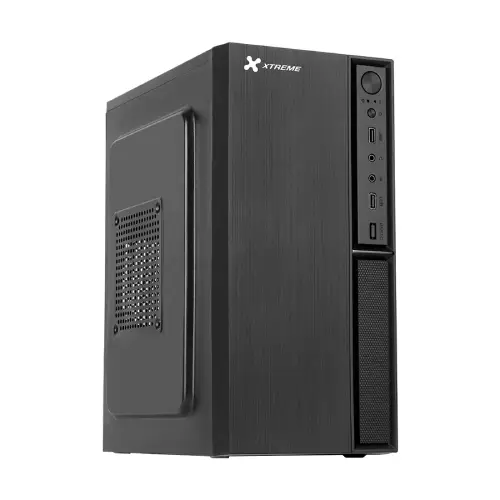
The Xtreme F02 Thermal is a mini tower PC case built for users who want a compact, budget-friendly chassis for everyday computing. Designed around a simple, functional layout, it supports small form-factor motherboards up to Mini-ATX and Mini-ITX, making it a practical choice for home offices, student setups, and basic desktop builds where space and cost matter.
This casing is compatible with Mini-ATX and Mini-ITX motherboards, allowing you to assemble a neat system without the bulk of a full-size cabinet. If you’re pairing it with an entry-level CPU and a standard GPU, the F02 Thermal helps you keep the build clean and manageable—especially useful in tight desks or shared workspaces.
The chassis uses sturdy SPCC along with plastic construction, balancing durability with a straightforward design. The black finish gives it a sleek, professional look that blends well with both home and office environments. Compared to more premium cases that focus heavily on aesthetics, this model prioritizes essential structure and build practicality for reliable daily use.
For storage, the Xtreme F02 includes two 3.5-inch and two 2.5-inch drive bays. This combination is ideal if you want flexibility—such as using a 3.5-inch HDD for larger capacity storage alongside 2.5-inch SSDs for faster boot and application loading. It’s a good fit for office documents, study materials, and general multimedia libraries.
The case provides four expansion card slots, giving you room to add or upgrade components like a graphics card or other expansion hardware. With four slots, it supports typical entry-level build paths where you may start with integrated graphics and later add a dedicated GPU if your workload or light gaming needs grow.
The Xtreme F02 Thermal does not come with built-in cooling fans, and it also does not include lighting fans. However, it includes one additional fan slot to improve airflow when you install a suitable fan. For best results, consider adding at least one intake or exhaust fan based on your component layout—this helps maintain stable temperatures during longer office sessions or light gaming.
The case supports a maximum CPU cooler height of 140mm, which helps accommodate many common air coolers used in entry-level and mainstream builds. It also supports a maximum graphics card length of 200mm, making it suitable for compact GPUs. This clearance makes the F02 Thermal a sensible option when you want a balanced system without needing oversized cooling or large graphics cards.
For basic connectivity, the front panel includes two USB 1.0 ports. This is convenient for connecting simple peripherals such as keyboards, mice, or basic external devices during setup and daily use. If you plan to connect modern high-speed USB devices frequently, you may want to rely on additional ports from your motherboard or use a USB hub for smoother connectivity.
The Xtreme F02 Thermal is designed as a low-cost, no-frills mini tower case. It’s especially suitable for beginners due to its straightforward assembly approach and compact footprint. If you’re building a system for web browsing, office work, online classes, or light gaming, this case offers the essential features you need—without paying extra for RGB lighting or advanced cooling features.
This model is supplied without a power supply (PSU), so you’ll need to choose a compatible PSU separately for your build. It also does not include an optical drive bay, so it’s best suited for modern setups that rely on USB installation media or network-based installation rather than disc drives.
Get specific details about this product from customers who own it.
