0 item(s)
YOUR CART
| Basic Information | ||
| Watt | 100W PD | |
| Interface / Port | USB Type-C | |
| Other Features | Max. 5 Gbps data transfer, HDMI up to 4K@30fps, SD & Micro SD slots, Gigabit RJ45 up to 1000 Mbps, audio port, control knob and function buttons (lock, HDMI switching, light control, quick screenshots) | |
The Gamdias Mercury P1-1500 is designed for users who want more control and flexibility from a single USB Type-C connection. With a dedicated Type-C host input, it expands your laptop or modern tablet into a more complete setup—ideal for home offices, study desks, and compact workstations where cable clutter is a daily problem. Instead of juggling multiple adapters, this Type-C hub consolidates essential connectivity into one streamlined device, helping you stay productive with fewer interruptions.
For data movement, the hub supports high-speed Type-C data transfer with a maximum rate of 5 Gbps. This makes it well-suited for transferring large documents, moving photo and video files from portable storage, and quickly syncing everyday peripherals. Compared to slower USB connections, 5 Gbps helps reduce waiting time during routine tasks—especially when you frequently back up files or share media between devices.
A key advantage of the Mercury P1-1500 is its dedicated Type-C Power Delivery port, supporting up to 100W. This means you can charge your compatible device while using the hub’s other ports, which is particularly useful for long work sessions, presentations, and travel setups. It also helps keep your desk organized because you can rely on one primary connection for both power and connectivity rather than using separate charging and data cables.
The hub includes an HDMI port that supports up to 4K resolution at 30fps. This feature is practical for connecting an external monitor for presentations, extending your workspace for multitasking, or enjoying media playback on a larger screen. If you’re using a laptop with a smaller display, the 4K HDMI output can make spreadsheets, design work, and slide decks easier to read—helping you present with clarity and reduce eye strain during longer sessions.
With SD and Micro SD card slots, the Mercury P1-1500 simplifies file transfer from cameras, action cams, and portable memory cards. Instead of relying on card readers that take extra space, you can plug in the card directly and move files more conveniently. This is especially helpful for photographers, content creators, and students who frequently transfer media between devices for editing, sharing, or backup.
When Wi-Fi is unreliable, the hub’s Gigabit RJ45 port provides stable wired networking up to 1000 Mbps. This is a strong choice for video calls, online classes, large downloads, and work tasks that require consistent connectivity. Compared to fluctuating wireless signals, a wired connection can improve meeting stability and reduce lag—making it a smart addition for busy home networks and shared office environments.
The built-in audio port lets you connect headphones or speakers directly to the hub. This can be convenient when your laptop’s audio jack is hard to access, blocked by a case, or already in use. It also supports a cleaner desk setup by reducing the number of separate dongles you need for daily listening during calls, study sessions, or media playback.
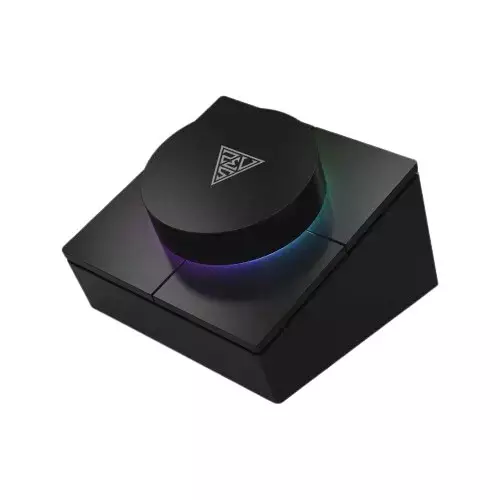
What sets the P1-1500 apart is its physical control system, featuring one control knob and four function buttons. These controls are intended for lock, HDMI switching, light control, and quick screenshots. Having dedicated buttons can be faster and more comfortable than relying only on software shortcuts—especially during presentations or when you need to switch outputs and capture moments quickly without interrupting your workflow.
If you’re building a compact workstation in Bangladesh—whether for office productivity, remote learning, or daily multimedia use—the Gamdias Mercury P1-1500 Type-C hub offers a practical balance of performance and convenience. With 5 Gbps data transfer, up to 100W charging, 4K HDMI output, SD/Micro SD storage access, and Gigabit Ethernet, it’s a feature-rich solution for users who want reliable connectivity in one place. For buyers looking for a versatile Type-C hub with added hands-on controls, this model is a strong option to consider.
Get specific details about this product from customers who own it.