0 item(s)
YOUR CART
| Basic Information | ||
| Watt | 100W | |
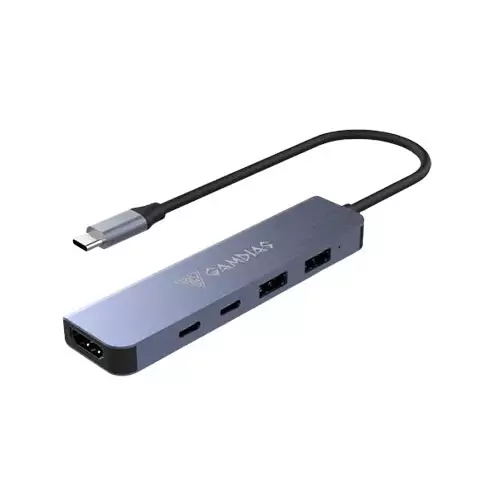
| Interface / Port | 2x Type-C, 2x USB, 1x HDMI | |
| Plug | Plug-and-play | |
| Other Features | Max. 5 Gbps data transfer; Max. 4K @ 30fps HDMI; USB-C Power Delivery up to 100W | |
| Warranty Information | ||
| Warranty | 1 year Warranty | |
The Gamdias Mercury M1-500 5-in-1 Type-C Hub is built for users who want more ports without carrying multiple adapters. With a compact, travel-friendly design, this USB-C hub helps modern laptops and tablets that offer limited built-in connectivity by turning a single Type-C connection into a practical workstation setup. Whether you’re working on documents, transferring files, streaming media, or connecting a display for presentations, the hub is designed to keep your daily workflow smooth and organized.
This 5-in-1 hub provides 2x Type-C, 2x USB, and 1x HDMI output, giving you flexible options for peripherals and display needs. The inclusion of multiple USB connections makes it easier to connect common accessories such as storage devices and other USB peripherals, while the HDMI port supports external monitor or TV connections for a larger viewing experience. The hub’s layout is especially useful for home office setups, study environments, and casual content creation where you need quick access to multiple connections.
With a maximum data transfer speed of up to 5 Gbps, the Gamdias Mercury M1-500 supports efficient file transfers between your laptop and connected USB devices. This makes it suitable for moving documents, transferring photos, and handling everyday data tasks without unnecessary delays. Compared to slower USB hubs, a 5Gbps-capable hub is a better fit for users who frequently copy files and want a more responsive experience during daily use.
The built-in HDMI port supports resolution up to 4K at 30fps, enabling clear external display output for presentations, video streaming, and productivity-focused screen extension. If you work with spreadsheets, slides, or multi-window tasks, connecting to an external display can improve readability and reduce the need to constantly switch between tabs. For movie watching or sharing content in meetings, the HDMI output helps you present a bigger, more comfortable screen experience.
For users who need to stay powered during use, the hub includes a dedicated USB-C Power Delivery port with support up to 100W. This allows compatible devices to charge while peripherals are connected, helping you avoid the inconvenience of unplugging power to use the hub. It’s a practical choice for long study sessions, office work, and travel days where you want one streamlined setup: connect the hub, connect your devices, and keep charging through the same hub.
The Gamdias Mercury M1-500 Type-C hub is plug-and-play, meaning it works instantly without installing additional drivers. This simplifies setup for students, office workers, and casual creators—just connect the hub to your USB-C device and start using the available ports. The straightforward installation also makes it convenient to move between different devices or locations without complicated configuration.
If you’re looking for a reliable USB-C hub in Bangladesh that can expand connectivity for daily tasks—such as connecting USB peripherals, using HDMI for external displays, and charging through Power Delivery—this model is a strong option. It’s especially helpful for users who want to reduce cable clutter and keep a clean desk or bag setup. Choose the Gamdias Mercury M1-500 when you need a compact, efficient hub that supports up to 5Gbps data transfer, 4K HDMI output at 30fps, and up to 100W charging support.
Does the Gamdias Mercury M1-500 support fast charging?
Yes. The USB-C Power Delivery port supports charging up to 100W for compatible devices.
What display resolution does the HDMI port support?
The HDMI output supports up to 4K resolution at 30fps.
Is any software required to use this Type-C hub?
No. It is plug-and-play and works without installing additional drivers.
Get specific details about this product from customers who own it.