
0 item(s)
YOUR CART
| Basic Information | ||
| Supported CPU | AMD Ryzen 9000 & 8000 & 7000 Series Desktop Processors | |
| Chipset | AMD X870 | |
| Form Factor | ATX | |
| Memory | ||
| Number of Memory Slots | 4 | |
| Maximum Memory | 256GB | |
| Supported Memory | DDR5 | |
| Graphics | ||
| Graphics | 1 x HDMI port 2 x USB4 (40Gbps) ports support USB Type-C display outputs Graphics specifications may vary between CPU types. Please refer to AMD CPU specifications. Supports 4K@60Hz as specified in HDMI 2.1. Supports max. 4K@60Hz as specified in DisplayPort 1.4a. VGA resolution support depends on processors' or graphic cards' resolution. | |
| Expansion Slots | ||
| Expansion Slots | PCI: AMD Ryzen 9000 & 7000 Series Desktop Processors 1 x PCIe 5.0 x16 slot (supports x16 mode) AMD Ryzen 8000 Series Desktop Processors 1 x PCIe 4.0 x16 slot (supports x8/x4 mode) AMD X870 Chipset 2 x PCIe 4.0 x16 slots (support x1 mode) 1 x PCIe 3.0 x16 slot (supports x1 mode) M.2 Socket: AMD Ryzen 9000 & 7000 Series Desktop Processors M.2_1 slot (Key M), type 2280 (supports PCIe 5.0 x4 mode) M.2_2 slot (Key M), type 2242/2260/2280 (supports PCIe 4.0 x4 mode) AMD Ryzen 8000 Series Desktop Processors M.2_1 slot (Key M), type 2280 (supports PCIe 4.0 x4 mode) M.2_2 slot (Key M), type 2242/2260/2280 (supports PCIe 4.0 x4/x2 mode) AMD X870 Chipset M.2_3 slot (Key M), type 2280 (supports PCIe 4.0 x4 mode) 4 x SATA 6Gb/s ports | |
| Storage | ||
| Supported Storage | Total supports 3 x M.2 slots and 4 x SATA 6Gb/s ports AMD Ryzen 9000 & 7000 Series Desktop Processors M.2_1 slot (Key M), type 2280 (supports PCIe 5.0 x4 mode) M.2_2 slot (Key M), type 2242/2260/2280 (supports PCIe 4.0 x4 mode) AMD Ryzen 8000 Series Desktop Processors M.2_1 slot (Key M), type 2280 (supports PCIe 4.0 x4 mode) M.2_2 slot (Key M), type 2242/2260/2280 (supports PCIe 4.0 x4/x2 mode) AMD X870 Chipset M.2_3 slot (Key M), type 2280 (supports PCIe 4.0 x4 mode) 4 x SATA 6Gb/s ports 2 x USB4 (40Gbps) ports share bandwidth with M.2_2 slot. The M.2_2 slot will be disabled when either of the two USB4 (40Gbps) ports is running. You can enter the BIOS to adjust the default Settings as required. The PCIEX16(G3) slot shares bandwidth with the SATA6G_3 and SATA6G_4 ports. Both SATA ports will be disabled when the PCIEX16(G3) slot is running. You can enter the BIOS to adjust the default Settings as required. Specifications vary by CPU types. | |
| Network | ||
| LAN | 1 x Realtek 2.5Gb Ethernet | |
| Wireless | Wi‑Fi 7 | |
| Audio | ||
| Audio | Realtek 7.1 Surround Sound High Definition Audio CODEC* - Supports: Jack-detection, Multi-streaming, Front Panel Jack-retasking - Supports up to 24-Bit/192 kHz playback | |
| BIOS | ||
| BIOS | 256 Mb Flash ROM, UEFI AMI BIOSc | |
| Ports & Connectors | ||
| HDMI | 1x HDMI 2.1 | |
| USB Ports | Rear USB (Total 10 ports) 2 x USB4 (40Gbps) ports (2 x USB Type-C) 1 x USB 10Gbps port (1 x Type-A) 3 x USB 5Gbps ports (3 x Type-A) 4 x USB 2.0 ports (4 x Type-A) Front USB (Total 7 ports) 1 x USB 20Gbps connector (supports USB Type-C) 1 x USB 5Gbps header supports 2 additional USB 5Gbps ports 2 x USB 2.0 headers support 4 additional USB 2.0 ports USB Type-C power delivery output: max. 5V/3A | |
| RAID | AMD RAIDXpert2 Technology Ryzen 9000 Series Processors: RAID 0/1/5/10 Ryzen 8000 Series Processors: RAID 0/1 Ryzen 7000 Series Processors: RAID 0/1/10 Specifications vary by CPU types. | |
| TPM (Trusted Platform Module ) | 1 x SPI TPM header (14-1 pin) | |
| Internal I/O Ports | Fan and Cooling Related 1 x 4-pin CPU Fan header 1 x 4-pin CPU OPT Fan header 1 x 4-pin AIO Pump header 4 x 4-pin Chassis Fan headers Power Related 1 x 24-pin Main Power connector 2 x 8-pin +12V CPU Power connectors Storage Related 3 x M.2 slots (Key M) 4 x SATA 6Gb/s ports USB 1 x USB 20Gbps connector (supports USB Type-C®) 1 x USB 5Gbps header supports 2 additional USB 5Gbps ports 2 x USB 2.0 headers support 4 additional USB 2.0 ports Miscellaneous 3 x Addressable RGB Gen 2 headers 1 x Clear CMOS header 1 x Chassis Intrusion header 1 x COM Port header 1 x Front Panel Audio header (F_AUDIO) 1 x S/PDIF Out header 1 x SPI TPM header (14-1 pin) 1 x 10⁻¹ pin System Panel header | |
| Others | ||
| Bundled Software | ASUS Exclusive Software Armoury Crate - Aura Creator - Aura Sync - Fan Xpert 4 with AI Cooling II ASUS AI Advisor ASUS DriverHub ASUS GlideX TurboV Core ASUS CPU-Z Norton 360 Deluxe (60 Days Free Trial) WinRAR (40 Days Free Trial) UEFI BIOS ASUS EZ DIY - ASUS CrashFree BIOS 3 - ASUS EZ Flash 3 - ASUS UEFI BIOS EZ Mode - ASUS MyHotkey | |
| Wireless Communication module | Wireless Communication module | |
| Special feature | PCIe 5.0 support | |
| Warranty | ||
| Warranty | 3 Years | |
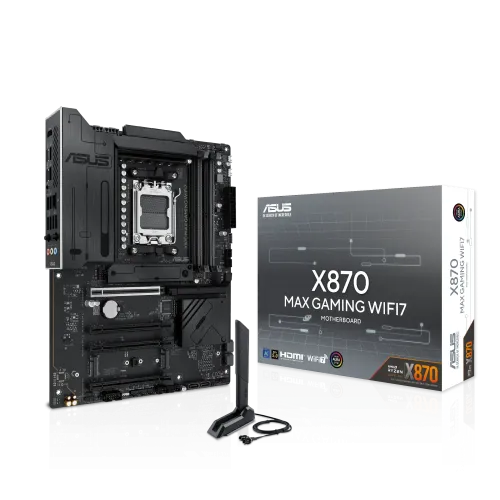
The ASUS X870 MAX GAMING (Wi‑Fi 7) Black DDR5 AMD Motherboard (#X870 MAX GAMING WIFI7) is built for gamers and PC enthusiasts who want a modern AM5 platform with strong performance, stable operation, and future-ready expansion. Designed in an ATX form factor, it’s a great foundation for high-performance desktop systems where you want fast connectivity, responsive gaming performance, and room to grow with next-generation components.
Powered by the AMD X870 chipset and using the AM5 socket, this motherboard supports AMD Ryzen 9000, 8000, and 7000 Series Desktop Processors. That compatibility makes it suitable for both new builds and upgrades—especially if you’re moving to a newer Ryzen generation for improved efficiency and smoother multitasking. If you’re building a gaming PC, pairing this board with a compatible Ryzen CPU helps you take advantage of modern platform features for faster system responsiveness during gameplay, streaming, and content creation workflows.
With DDR5 memory support, four memory slots, and a maximum memory capacity of up to 256GB, the ASUS X870 MAX GAMING is designed to handle demanding workloads. DDR5’s higher bandwidth and improved efficiency are beneficial for gaming scenarios with heavy asset loading, as well as productivity tasks like photo/video editing and large-scale multitasking. For users who want a balanced setup, this board supports flexible memory configurations—allowing you to start with a practical capacity and expand later as your needs grow.
Built-in Wi‑Fi 7 delivers lightning-fast wireless connectivity with reduced latency and more stable performance compared to earlier Wi‑Fi generations. This is especially useful for competitive gaming, where responsiveness matters, and for streaming or video calls where consistent throughput helps maintain quality. If you prefer a clean setup without extra network cards, the integrated wireless communication module simplifies installation and keeps your build organized.
The motherboard includes PCIe 5.0 support, giving you a future-ready path for next-generation GPUs and NVMe storage devices. This makes it a strong choice for users who want to build today while keeping upgrade options open for faster storage and graphics performance later. For enthusiasts, PCIe 5.0 can be particularly appealing when planning high-speed NVMe drives for faster game load times and smoother application performance.
Designed with a strong VRM and heatsink approach for reliable overclocking, the ASUS X870 MAX GAMING is aimed at stable performance during intense workloads. In real-world use, that means better confidence during long gaming sessions, heavy rendering, or sustained productivity tasks. The black color scheme also complements performance-oriented builds, giving your system a bold and professional look that fits well in both home setups and office-style workstations.
Before purchasing, confirm your case supports ATX motherboards and ensure your chosen CPU is compatible with the AM5 socket. Also plan your memory configuration based on your workload—gamers may prioritize balanced capacity and speed, while creators and multitaskers may benefit from higher total memory capacity up to 256GB. With Wi‑Fi 7 built in and PCIe 5.0 support for future upgrades, this motherboard is a strong match for users building a modern DDR5 gaming system in Bangladesh.
Get specific details about this product from customers who own it.
