
0 item(s)
YOUR CART
| Besic Information | ||
| Type | Mechanical Gaming Keyboard | |
| Wired/Wireless | Wireless (USB & USB Dongle) | |
| Key Switch Type | Red Switch | |
| Number of keys | 68 keys | |
| Other Features | ROG NX switches, interactive touch panel, keyboard cover case, Aura Sync per-key RGB, up to 450-hour battery life (RGB off) | |
| Technical Specification | ||
| Keyboard Interface | USB & USB Dongle | |
| Lighting | Yes (per-key RGB, Aura Sync) | |
| Switch Type | ROG NX mechanical switches | |
| Physical Specifications | ||
| Color(s) | Black | |
| Warranty Information | ||
| Warranty | 1 year | |
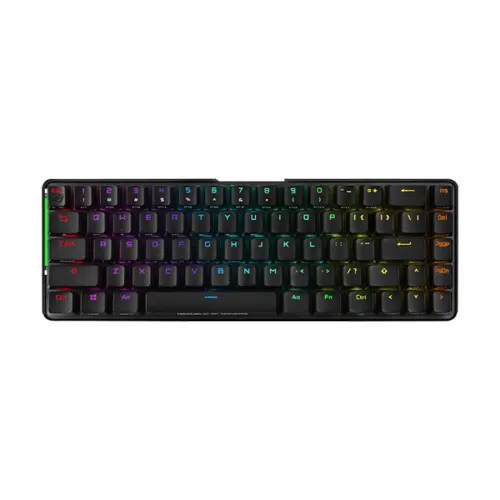
The ASUS ROG Falchion M601 RGB is a compact mechanical gaming keyboard designed for fast, accurate input and immersive RGB lighting. Built with mechanical key switches and a sleek black finish, it’s a strong choice for gamers and power users who want responsive keystrokes in a space-saving layout. With dual connectivity options (wired USB and wireless via USB dongle), you can switch between low-latency gaming and convenient desk setup without changing your workflow.
This keyboard uses ROG NX mechanical switches, tuned for a satisfying keystroke experience. The switches feature a lubricated stem and lubricated housing to help deliver smooth clicks while reducing unwanted bouncing noise. For gamers, this translates into more consistent actuation during rapid key presses—useful for FPS, MOBA, and rhythm-style gameplay where timing matters. If you’re coming from membrane keyboards, you’ll typically notice a clearer tactile response and improved durability for daily intensive use.
The ASUS ROG Falchion M601 RGB supports dual-mode operation: wired USB for direct connection and wireless performance using a 2.4 GHz RF connection through a USB dongle. This gives you the freedom to keep your desk cleaner while maintaining stable performance during gaming sessions. The wireless mode is especially convenient for couch or living-room setups, while wired mode is ideal when you want maximum reliability for long tournaments or competitive practice.
Enjoy vibrant per-key RGB lighting with wireless Aura Sync support. The lighting enhances visibility in dark environments and helps you create personalized profiles for different games or productivity tasks. For buyers who care about battery efficiency, the keyboard’s battery life is stated as up to 450 hours with RGB lighting off—so you can extend runtime significantly when you don’t need full illumination.
The compact 65% design is built to keep essential keys within reach while freeing up space for mouse movement and other accessories. It incorporates arrow and navigation keys in a smaller footprint, making it practical for both gaming and everyday work. Compared to full-size keyboards, this layout is easier to fit on smaller desks and can improve comfort by reducing how far your hands travel during frequent navigation.
An interactive touch panel makes it easier to adjust and customize controls without relying solely on key combinations. This is helpful for quickly changing settings such as volume or other in-game/utility functions during gameplay. The included keyboard cover case adds practical protection for transport—useful if you frequently carry your keyboard for LAN events, classes, or office work.
ROG PBT doubleshot keycaps are designed for durability and long-term performance. PBT keycaps are known for resisting wear from daily use, and doubleshot construction helps maintain legends even after extended typing. This makes the keyboard a good fit for users who type a lot, game daily, or want a premium feel that stays consistent over time.
If you want a wireless mechanical gaming keyboard with RGB, compact layout convenience, and dual-mode connectivity, the ASUS ROG Falchion M601 RGB is a well-rounded option. It’s particularly suitable for gamers who switch between gaming and productivity, and for users who prefer a cleaner desk setup with wireless operation. For pricing in Bangladesh, the product price is not mentioned due to stock unavailability, so availability may vary; checking current stock and configuration options before purchase is recommended.
Get specific details about this product from customers who own it.
