
0 item(s)
YOUR CART
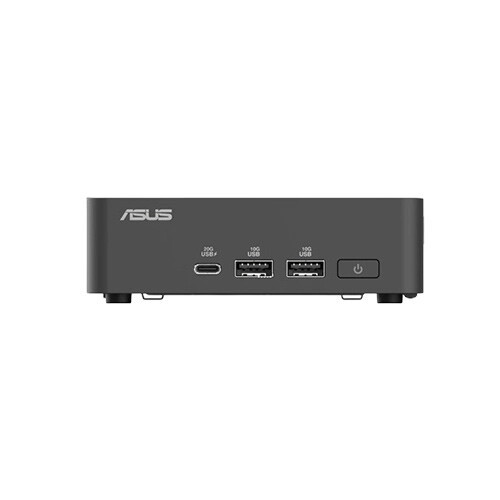


| Basic Information | ||
| Processor | Intel Core i3 1315U | |
| RAM | Barebone (No RAM) | |
| Storage | Barebone (No HDD/SSD) | |
| Graphics | Integrated/Shared Graphics | |
| Others | Mini PC (Barebone PC) | |
| Physical Specification | ||
| Color | Black | |
The ASUS NUC 15 Pro Intel Core i3 1315U Black mini PC is a compact barebone desktop solution built for users who want efficient everyday computing in a space-saving form factor. As a barebone PC, it comes without pre-installed RAM and storage, giving you the freedom to choose compatible memory and SSD/HDD options based on your workload and budget. Powered by the 13th Gen Intel Core i3 1315U processor, this mini PC is designed to handle routine productivity tasks smoothly—such as office work, web browsing, document editing, and media consumption—while keeping your setup tidy and organized.
With its black chassis and mini PC footprint, the ASUS NUC 15 Pro fits easily into home workspaces, office desks, reception areas, and other environments where desk space is limited. Compared to a traditional desktop tower, a mini PC helps reduce clutter and makes it easier to place your system behind a monitor or in a dedicated workstation corner. This makes it a strong choice for users who want a clean, professional-looking setup for daily computing, digital signage-style usage, or general office applications.
The included Intel Core i3 1315U is built to deliver reliable performance for everyday tasks. With support for speeds up to 4.50GHz, it’s suitable for multitasking scenarios like having multiple browser tabs open, working with office applications, and streaming or casual content playback. If you’re upgrading from older systems, this 13th Gen platform can feel more responsive for day-to-day use, especially when paired with fast SSD storage and adequate RAM.
The ASUS NUC 15 Pro uses integrated/shared graphics, which is ideal for typical office productivity, web-based work, and media playback. It’s a practical option if your primary needs are documents, spreadsheets, presentations, browsing, and light creative tasks. For users who plan to run heavy 3D workloads or high-end gaming, you would typically need a different graphics approach; however, for general computing and media use, integrated graphics are often the most cost-effective and power-efficient route.
Because this is a barebone PC, you can customize the system by selecting the RAM and storage that match your requirements. This flexibility is especially useful if you already own compatible memory or SSDs and want to reuse them. For smoother performance in daily use, pairing the mini PC with sufficient RAM and an SSD is recommended, as it can significantly improve application loading times and overall responsiveness compared to slower storage options.
This mini PC is a good fit for students, office users, and home productivity setups that prioritize compact size and efficient performance. It’s also suitable for reception desks and workspace environments where a full-size desktop would take up too much room. If you want a customizable platform rather than a fixed configuration, the barebone design lets you build a configuration that fits your exact needs—whether you’re focusing on everyday productivity, browsing, or media consumption.
Since the ASUS NUC 15 Pro is sold as a barebone PC, make sure to plan your RAM and storage selection before purchase. Choose memory and storage capacity that align with your typical workload, and consider using an SSD for faster boot and application access. With the right components, this compact system can become a reliable, efficient workstation that delivers strong daily performance while keeping your setup neat and space-efficient.
Get specific details about this product from customers who own it.
