
0 item(s)
YOUR CART


| Basic Information | ||
| Processor | Intel Core 7 240H | |
| RAM | 16GB | |
| Storage | 1TB SSD | |
| Graphics | Shared | |
| Monitor | 23.8 Inch FHD (1920x1080) | |
| Operating System | Free-Dos | |
| Others | Display: Wideview, LED Backlit, 250nits, sRGB: 100%, Screen-to-body ratio 93%, View angle(H/V) 178/178, Refresh rate 100Hz. Stand type Normal Stand, PCIe 4.0 SSD, Realtek RTL8111H 10/100/1000 Mbps, Privacy Shutter With privacy shutter, Built-in array microphone, Built-in speakers, 120W AC Adapter, Output: 20V DC, 6.0A, 120W, Input: 100~240V AC 50/60Hz universal, 1x DC-in. | |
| Connectivity | ||
| LAN | 1 x Ethernet (RJ-45) | |
| WiFi | Wi-Fi 7(802.11be) (Triple band) 2x2 | |
| Bluetooth | Bluetooth 5.4 | |
| Input Device | ||
| Keyboard | Wired Keyboard | |
| Mouse | Wired Mouse | |
| Optical Drive | No | |
| Physical Specification | ||
| Dimension | 541 x 416 x 17mm | |
| Weight | 6.90 kg | |
| Color | Black | |
| Warranty | ||
| Warranty | 3 Year (Box Mandatory While Claiming) | |
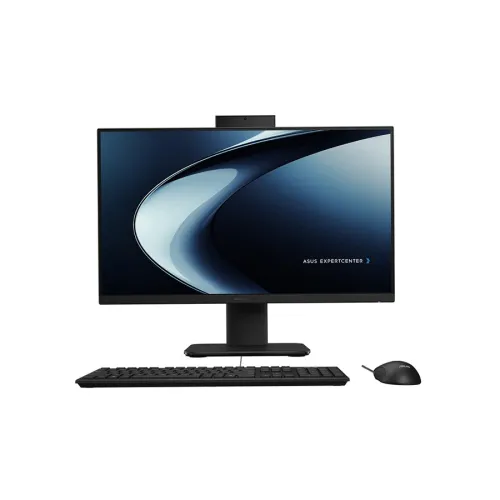
The ASUS ExpertCenter P400 AiO P440VAK is a sleek 23.8-inch all-in-one desktop designed to simplify workspace setup while delivering reliable performance for daily business tasks. With a Full HD (1920x1080) display, 16GB RAM, and a spacious 1TB SSD, this system is well-suited for office productivity, document work, web-based applications, and smooth multitasking. Its compact all-in-one design helps reduce cable clutter and saves desk space compared to traditional tower PCs paired with separate monitors.
Featuring a 23.8-inch FHD screen (1920x1080), the P440VAK offers crisp text and detailed visuals for spreadsheets, reports, and everyday browsing. Compared to lower-resolution displays, Full HD helps keep content readable during long working hours—especially when you’re working with dense tables, charts, or multiple browser tabs. The all-in-one form factor also makes it easier to position the screen at a comfortable viewing distance without needing extra monitor stands.
Equipped with 16GB RAM, this ASUS ExpertCenter model supports efficient multitasking for typical office workflows. You can comfortably handle common productivity activities such as working on documents, managing emails, using office software, and running multiple applications at the same time. For users who frequently switch between tasks, 16GB helps reduce slowdowns and improves overall responsiveness during busy work sessions.
The system includes a 1TB SSD, providing ample storage for documents, presentations, media files, and software. SSD storage delivers faster boot times and quicker application loading compared to HDD-based systems, which can be especially beneficial in office environments where time matters. With 1TB capacity, it’s easier to keep frequently used files on the device rather than relying heavily on external drives.
The graphics memory is listed as shared, which aligns with typical all-in-one office usage. This setup is generally ideal for everyday tasks such as web conferencing, office applications, light content viewing, and general productivity work. If your work involves heavy 3D rendering or advanced professional graphics workloads, you may need a dedicated graphics configuration—but for standard business use, shared graphics can be a practical and cost-effective choice.
With its black all-in-one design, the ASUS ExpertCenter P400 AiO P440VAK blends neatly into professional setups—whether it’s for corporate desks, training rooms, or institutional use. All-in-one PCs are also convenient for organizations that want easier deployment and simpler cable management. For buyers in Bangladesh, this model is positioned as a practical solution for office and corporate equipment needs, with support options available through PQS Computers for troubleshooting, technical assistance, and configuration services.
The price of ASUS ExpertCenter P400 AiO P440VAK All-in-One starts from 155,000 in Bangladesh, and may vary depending on customization and product availability. If you’re purchasing for office, corporate, or institutional use, you can consider configuration support to match the setup to your specific workflow requirements, helping ensure the system is ready for day-to-day use from the start.
Get specific details about this product from customers who own it.
